Boundary Mapping With a Gator: How Farmers Are Using the John Deere Operations Center in Unexpected Ways
4/1/2026
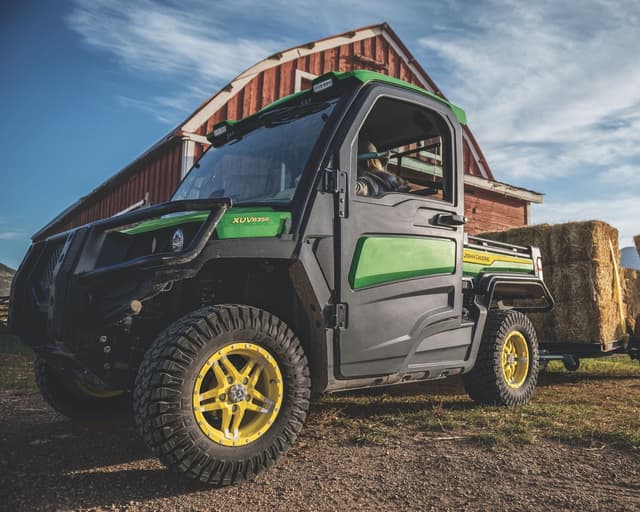
When farmers think about adding precision ag technology to their operation, the Gator rarely comes to mind. It's an excellent utility vehicle for navigating field perimeters, but with the right equipment, it can also serve as a powerful data collection tool. By pairing your Gator with the John Deere Operations Center, you can capture accurate boundary data that improves efficiency across your entire operation. Here's how it works and why it's worth adding to your farm.
A high-quality boundary logged in the Operations Center creates a clean, accurate field perimeter that integrates directly with John Deere's guidance systems. As a result, you can perform straighter passes and better field-level planning. Once recorded, the Operations Center automatically calculates true field acreage, eliminating manual measurement errors and the time spent estimating field size. Boundaries can also be shared across your operation and accessed on multiple displays or devices through the Operations Center.
Traditionally, boundary mapping meant running a tractor or large implement around field edges. Using a Gator instead keeps heavy machinery out of sensitive areas while still capturing centimeter-level accuracy with the right receiver. This is especially valuable in early spring when field edges are soft, or in irregularly shaped fields with tight turns and hard-to-navigate obstacles.
Accurate boundaries directly improve sprayer efficiency. When an applicator's guidance system references a precise boundary, it can calculate optimal swath patterns that minimize end-of-field overlap and cut-offs. This results in better, more consistent coverage. Fewer missed passes and fewer double-sprayed headlands mean less chemical waste and stronger crop protection. Boundary and coverage maps in the Operations Center give you a clear picture of application accuracy over time.
If you plan to add more autonomous technology to your operation, boundary mapping is a smart place to start building your foundation. John Deere's AutoTrac system and emerging autonomous platforms rely on precise boundary data to define operating zones, set no-go areas, and execute end-of-row turns safely. Farmers who establish accurate boundaries now are building the data infrastructure their operation will need as automation becomes more accessible and more essential.
Accurate boundary mapping starts with the right equipment. You'll need two things: a StarFire 7000 Receiver and either a GreenStar 4 (Gen 4) Display or a CommandCenter (Gen 5) Display. Mount the StarFire 7000 on the Gator for a high-accuracy GPS signal. The Gen 4 or Gen 5 display connects to the receiver and serves as your interface for initiating and managing boundary recording. Reach out to our precision ag team at SNPartners for help selecting the right display for your Gator or for assistance with mounting and connectivity.
Before heading out, walk or review the intended perimeter to identify any obstacles, boundary irregularities, or access points you'll need to account for. Set the receiver to the appropriate correction signal and allow it to achieve a stable fix before you begin. Confirm the display is connected and communicating with the Operations Center.
On the Gen 4 or Gen 5 display, navigate to the Field Documentation menu and create or select the relevant farm and field profile. Assign the boundary to the correct field within the Operations Center hierarchy — Farm → Field → Boundary — so your data stays organized and easy to reference.
Begin boundary recording on the display, then drive the Gator along the true field edge at a consistent, moderate speed. At corners or around obstacles, slow down to capture accurate GPS points. When you've completed the perimeter, close the boundary on the display. The system will automatically calculate your field acreage upon closure.
Log in to the John Deere Operations Center to verify that the recorded boundary looks correct. Review the acreage calculation and check for any gaps or irregularities in the boundary line, editing or smoothing as needed with the Operations Center's built-in tools. Once you're satisfied, you can share the boundary with other operators or connected equipment on your farm through the Operations Center's multi-user access features.
Use the capabilities of the John Deere Operations Center to your advantage. By setting up your Gator with the correct tools, you can gather valuable data on your fields, improving accuracy and efficiency.
Yes. When equipped with a StarFire 7000 Receiver and a GreenStar 4 (Gen 4) Display or CommandCenter (Gen 5) Display, a John Deere Gator can capture accurate GPS boundary data for your fields. The Gator is an especially practical option for mapping field perimeters without putting heavy equipment on sensitive ground.
You'll need two key components: a StarFire 7000 Receiver for a high-accuracy GPS signal and either a GreenStar 4 (Gen 4) Display or a CommandCenter (Gen 5) Display to initiate and manage boundary recording. Contact your local SNPartners location for help selecting the right display and setting up mounting and connectivity for your specific Gator model.
When your applicator's guidance system references a precise field boundary, it can calculate optimal swath patterns that reduce end-of-field overlap and missed passes. The result is more consistent chemical coverage, less product waste, and stronger crop protection across every application.
Yes. Once you complete and close a boundary on your display, the Operations Center automatically calculates true field acreage. That data can be accessed on multiple displays or devices and shared with other operators across your operation.
Getting started with precision ag can feel like a big lift, but boundary mapping is one of the most accessible entry points available, and the Gator makes it even easier. Contact your local SNPartners location to learn more about StarFire 7000 availability, display compatibility for Gator setups, and Operations Center onboarding support.